
Talentera Application Tracking System
  • Platform
        • Products
          • Applicant Tracking System
          • Skill Assessment & Screening
          • Employee Onboarding
        • Industry
          • Financial Services
          • Healthcare
          • Education
          • Public Sector
          • Retail & Hospitality
          • Aviation
          • Recruitment Agencies
        • Segments
          • Enterprise
          • Small to Mid-size
          • Startups
        • Solutions
          • Employer Branding
          • Talent Sourcing
          • Policy & Compliance
          • Emiratisation
          • Tawteen
          • Build Employee Referral
          • Automate Onboarding
          • Digital Transformation
  • Features
        • Features
          • Candidate Experience
          • Requisitions
          • Candidate Sourcing
          • Applicant Tracking
          • Assessment & Screening
          • Offers & Hiring Approvals
          • Onboarding
          • Talent CRM
          • Manpower Planning
          • Reporting & Analytics
          • Team Collaboration
          • Custom Development
          • See all features
  • Customers
  • Plans
        • Plans
          • Talentera Core
          • Talentera Pro
          • Talentera Enterprise
          • Job Board
  • Pricing
  • Resources
        • Resources
          • Blogs
          • HR Glossary
          • Library
          • Community Events
          • Webinar
          • Help Centre
        • Free Tools
          • Job Description Generator
          • Interview Questions Generator
          • Salary Estimator
  • English
  • عربي
Talentera Application Tracking System Schedule a Demo
Talentera Application Tracking System
  • English
  • عربي

Home | Resources | Organize your Job Postings with Tags

Home/ Resources / Organize your Job Postings with Tags
Resources Smart Recruitment

Organize your Job Postings with Tags

2 Minutes Read.
  Nov 11, 2019

When you’re hiring for several positions at the same time, your job posting list becomes long & unwieldy.

Sure, you can quickly find jobs you’re working on using standard filters like location, job owner or job title.

However, sometimes, you need to group job posts based on a custom need or criteria. For example, you might want to view only those positions that you’re hiring for this quarter. Or you’re interested in jobs linked to a certain product in the company. Sadly, the only way to do that would be to search for each job individually. 

Well, up till now that is.

The tech wizards at Talentera just rolled out a new feature called “Job Tags” this past week that gracefully solves this problem. Just like CVs, you will now be able to add custom tags to any job post to help you quickly label and organize them the way you want. After adding the tags, you can use a filter on the search panel to bring up jobs of interest with a click, thus, saving valuable time.

So, how does it work?
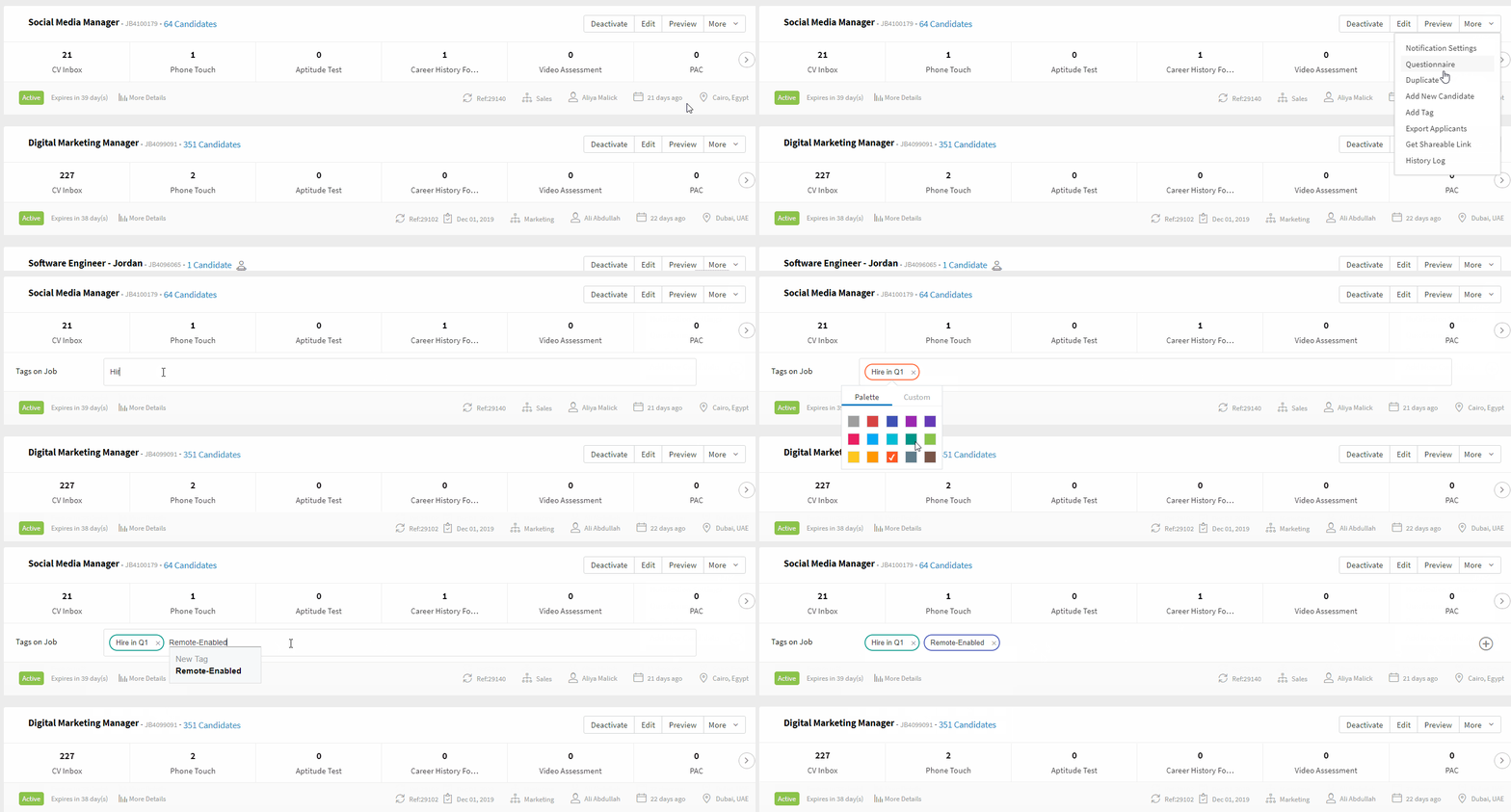
job tags

  1. On the “My Jobs” page, simply click on the actions menu against each job. Click on “Add Tag”.
  2. Start typing in a tag title. If you’re aiming to use an existing tag, it will show up as an auto-complete suggestion, otherwise, you can create on on the fly too.
  3. Select a color code and press Enter. You’re done.

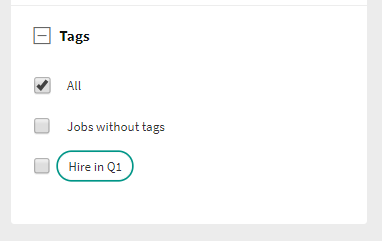
Once you’ve started adding job tags, can use the “Job Tags” search facet on the left menu to start filtering your jobs. It’s that simple!   job tag filter
The great news is that all our valuable customers (Core, Pro & Enterprise) will be able to access this feature. Of course, account admins will reserve the right to grant permissions to certain sub-users to be able to add new tags. This ensures the tag pool remains regulated and eliminates duplication.

Hope you find the feature useful!  Got questions? Get in touch with your account manager to see how you can make most of Job Tags.

—

If you’d like to speak with an expert to learn how Talentera can improve your company’s recruiting processes, please get in touch.

Please share this article if you like it!

v.siva
Article Written By

V.siva

Other Articles

New Hiring Trends: What to Expect in 2026
Previous

New Hiring Trends: What to Expect in 2026

AI-Powered Talent Sourcing: Unlocking Efficiency and Precision in Recruitment
Next

AI-Powered Talent Sourcing: Unlocking Efficiency and Precision in Recruitment

Before You Make Your Next Hiring Decision… Discover What Sets You Apart.

Subscribe to our newsletter to receive the latest Talentera content specialized in attracting top talent in critical sectors.

Platform

  • Products
    • Applicant Tracking System
    • Skill Assessment & Screening
    • Employee Onboarding
  • Industry
    • Financial Services
    • Healthcare
    • Public Sector
    • Retail & Hospitality
    • Recruitment Agencies

Customers

Plans

  • Talentera Core
  • Talentera Pro
  • Talentera Enterprise
  • Job Board

Resources

  • Resources
    • Blogs
    • Guides & Ebooks
    • Trust Center

Features

  • Requisitions
  • Candidate Experience
  • Candidate Sourcing
  • Talent CRM
  • Applicant Tracking
  • Reporting & Analytics
  • Assessment & Screening
  • Team Collaboration
  • Offers & Hiring Approvals
  • AI in Recruitment
  • Onboarding
  • Custom Development
  • See all features

Customers

Plans

  • Talentera Core
  • Talentera Pro
  • Talentera Enterprise
  • Job Board

Resources

  • Resources
    • Blogs
    • Guides & Ebooks
    • Trust Center
Talentera Application Tracking System
Talentera ATS - Facebook Channel Talentera ATS - LinkedIn Channel Twitter-X Talentera ATS - Instagram Channel Talentera ATS - Youtube Channel Talentera ATS - TikTok Channel
App Store Talentera Google Play Store Talentera
Privacy Policy Terms of Use Sub-processors Terms of Agreement Service Level Objectives
© 2025 Talentera. All Rights Reserved
Cookie Consent: By continuing to use our website, you consent to the use of cookies. To know more, please refer to our privacy policy.