



 Schedule a Demo
When recruiters or HR managers set up an automation from the smart rule page for document requests, they choose to send emails automatically once the document is submitted However, the receivers list might vary from time to time. In order to solve this issue, we have added a macro for the receiver list, where they can use it based on their type, which now allows them to add job owners to the receivers list.
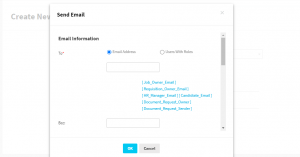
How it works:
1- Go to admin panel, smart rules.
2- Add a new smart rule, by selecting a document request as the object, set the event to be submitted, and the action to send the email.
3- From the opened modal, set the receivers by email, or by roles, and you are done!

Before You Make Your Next Hiring Decision… Discover What Sets You Apart.
Subscribe to our newsletter to receive the latest Talentera content specialized in attracting top talent in critical sectors.