


 Schedule a Demo
When recruiters move candidates to the onboarding stage, they sometimes prefer to send theme an email to begin the onboarding process. Now the recruiters can have it done automatically, as we added a new event for CVs in smart rules called “Sent to Onboarding” so that certain actions can be applied to them automatically (e.g. send an email, update stage, add a tag/note…etc.) For example: When Object is CV and Event is “Sent to Onboarding” Do xyz action. 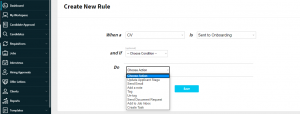
How it works:
1- Go to admin panel, smart rules.
2- Add a new smart rule, by selecting the CV as object, then open the event list and check “sent to onboarding” event, navigate through the available actions as well pick the one that serves your hiring automation needs, and you are done!

Before You Make Your Next Hiring Decision… Discover What Sets You Apart.
Subscribe to our newsletter to receive the latest Talentera content specialized in attracting top talent in critical sectors.