



 Request a Demo

Candidates evaluation form scores are one hover away!

Usually, when a recruiter wants to check the evaluation form result he/ she goes to the candidate CV evaluation form and checks the average score, however, this score shows the average of all candidates submitted answers to that evaluation form.
Since recruiters are keen to have more specific information as it will be much helpful during the decision-making process to check the calculated score for each candidate.
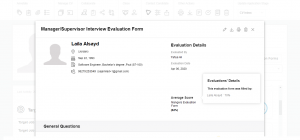
How it works:
1- Go to my jobs page from the system main menu
2- Pick a job with many applicants and has an evaluation form
3- Choose from the action filter
4- Then Go to evaluation Forms on CVs
5- Search for CVs with evaluation forms
6- Open any of the resulted CVs
7- Then go to Activities on CV panel
8- Pick an evaluation form from evaluation forms tab
9- Hover on the evaluation form average on the pop up to see the actual score for the candidate.