



 Request a Demo

Adding Default Values for Dynamic Form Fields


Ah, the forms. As important as they are to most HR functions, they can bring forth a world of tedium when it comes to actually filling them. You can’t blame recruiters and HR Managers for needing painstakingly detailed information in requisition forms and evaluation forms. At the same time, it’s natural for respondents to take their time with the laborious task of filling in these fields, oftentimes putting it on the backburner till they can make more time for it.
This whole process of going after respondents to complete various forms, be it recruiters, line managers or C-Level Executives, leaves lots of room for inefficiency in the entire recruitment process with unnecessary lags, poor response turnout and incorrectly filled fields as being some of the most common obstacles.
To make the whole form building and completing process leaner and more effective, we’ve made some enhancements to Talentera’s “Forms Management” module and here are all the woes that this update helps overcome:
When creating or editing a form, we’ve added a new Defaulting Fields tab to the form. Here, you can manage the default values for the fields you have included in the form you’re working on.
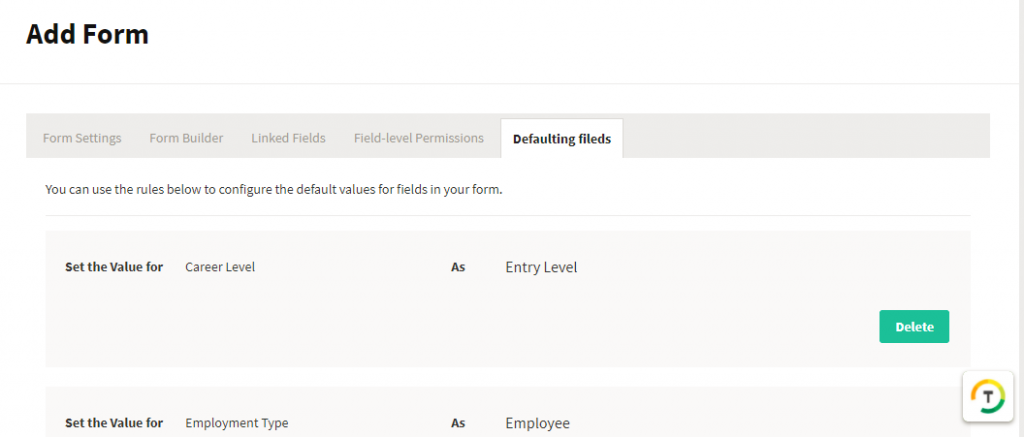
In this tab, you can set the default value for any chosen field that you’ve included in the form. So, for example, you could choose to always have the Career Level field set as Entry Level unless the respondent chooses otherwise.

Alternatively, if you’d like to add some rules to your default settings, there’s room for that too.
So, for instance, if you’re filling a job requisition where the Job Location is set at a specific country, let’s say, Saudi Arabia, you can set the default value for the Hiring Manager at the person who overlooks hiring in that specific region. You can achieve this by hitting that ‘Add Rule’ field like so:
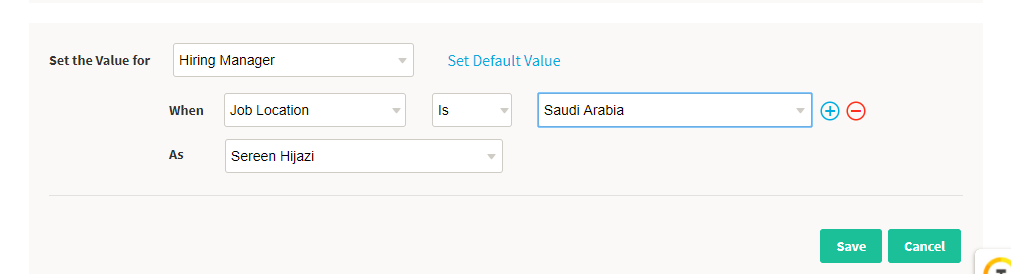
As a rule of thumb, in adding a rule, and you will be required to fill the fields in the format of “Set the value for Your Field When Certain Field is/is not Certain Field’s Value As Your Field’s default value.”
As you can see, this enhancement of adding default values (both with and without rules), dramatically quickens the form filling process by always defaulting fields that are usually fixed at one value or are supposed to take a value based on a predefined set of conditions unique to your organization.
This is a very unique and dynamic way of utilizing any form in your ATS system, and we highly recommended that you have it utilized to its full potential!
This enhancement is available for access to all Talentera customers. If you wish to learn more about this feature, please get in touch with your account manager as they will be happy to help.
If you’d like to speak with an expert to learn how Talentera can improve your company’s recruiting processes, please get in touch.